Terragrunt
Table of Contents
INTRODUCTION
Complements Terraform
Managing multiple environments
Thin wrapper when dealing with a large scale setup
BASIC CONCEPTS
Key Features
- Hierarchical configuration
- Remote Management
- Modular variable definitions
- Dry approach (Don’t repeat yourself)
Use Cases
- Complex infrastructure
- Managing deployments
What Problem Does Terragrunt Solve?
- Configuration complexity
- State management challenges
- Code duplication
- Consistency across platforms
- Collaboration and versioning
The DRY Principle
- Modular configuration
- Variable abstraction
- Hierarchical configuration
- Simplified maintenance
Install Terragrunt
GOOD TO KNOW
Terragrunt Cache
.terragrunt-cache
To reclaim space
# To find it
find . -type d -name ".terragrunt-cache"
# To delete it
find . -type d -name ".terragrunt-cache" -prune -exec rm -rf {} \;
To store in a centralice location use:
TERRAGRUNT_DOWNLOAD
Terragrunt with AWS
- AWS integration
- AWS provider configuration
- Terragrunt configuration for AWS
- Identity Access Management (IAM)
- S3 Backend for remote state
- Variable configuration
- Best practices for AWS with Terragrunt
Terragrunt Configuration Files
Terragrunt.hcl: Control centerHCLDeclarative- Inheritance Model. Using Blocks
- Locals
- remote_state
- include
- Module configuration
- Source
- version
- Variables
- Variable Definition
- var3
- var2
- var1
- Remote State Configuration
- Backend: Where to store files and how to access them
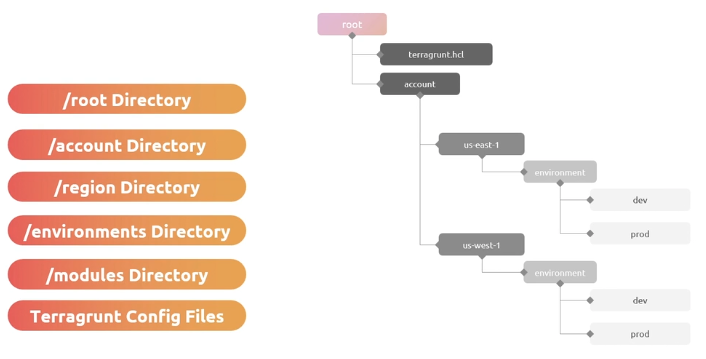
Directory Structure
- Root
terragrunt.hcl - Module directory
- Organized module structure
- Environment-specific configuration (fine tuning)
- Common variable definition
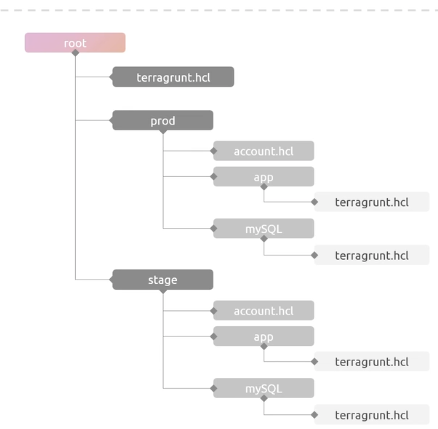
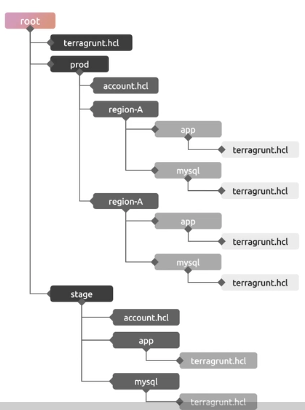
- Example directory structure
Supporting Files
account.hclregion.hclenv.hclcommon.hcl
Global Resources
Services do not fall in the traditional region category Deployed once per account Isolate Global services from region sub directories Maintain clear hierarchy and structure
Examples:
- IAM, Route53, WAF, CloudFront, ACM
TERRAGRUNT COMMANDS
terragrunt init: Plugins and Module dependenciesterragrunt validate: Semantics and sintaxis. Include it on CI/CD pipelinesterragrunt plan: Generate a detailed execution plan. Resources created, edited or deleted (Across config hierarchy)terragrunt apply: Initiate the application of theterraformterragrunt destroy: Initiate the destruction of resources provided byterraformterragrunt run-all: Execute specifiedterragrunt commandsBulk executionterragrunt init --reconfigure: ForcesTerragruntto bypass any locally cached backend configuration and completely reinitialize the underlyingTerraform statelocation.
# On a parent directory of your modules
terragrunt run-all init
terragrunt hclfmt: Used to formatHCLfiles
TERRAGRUNT FUNCTIONS
read_terragrunt_config: Enable to readterragruntconfiguration valuesfind_in_parent_folders: Search for specific files within parent folderspath_relative_to_include: Calculate the relative path from the currentterragruntconfig fileget_terragrunt_dir: Retrieve the directory path where the currentterragruntconfig files residesget_parent_terragrunt_dir: Obtain the directory path of the parentterragruntrun_cmd: Execute shell commands directly within yourterragruntconfigurations
Terraform + Terragrunt
basename(get_terragrunt_dir())
read_terragrunt_config
Considering:
vpc/
│  └── terragrunt.hcl
├── common.hcl
where common.hcl:
inputs = {
  project     = "kodekloud"
  environment = "dev"
}
Where terragrunt.hcl:
terraform {
  source = "..."
}
Locals {
  common_vars = read_terragrunt_config("../common.hcl")
}
inputs = {
  name = "${local.common_vars.inputs.project}-${local.common_vars.inputs.environment}-VPC"
}
find_in_parent_folders
With this we don’t need to rely on a relative path Same example as before
terraform {
  source = "..."
}
Locals {
  common_vars = read_terragrunt_config(find_in_parent_folders("common.hcl"))
}
inputs = {
  name = "${local.common_vars.inputs.project}-${local.common_vars.inputs.environment}-VPC"
}
path_relative_to_include
Calculate the relative path between two directories
terraform {
  source = "..."
}
Locals {
  common_vars = read_terragrunt_config(find_in_parent_folders("common.hcl"))
}

include "common" {
  path = find_in_parent_folders("common.hcl")
}

inputs = {
  name = "${local.common_vars.inputs.project}-${local.common_vars.inputs.environment}-VPC"
  tags = {
    Path = path_relative_to_include()
  }
}
This output: vpc
get_terragrunt_dir
Retrieves the path to the directory where the current terragrunt config file is
Dynamic adaptation
vpc/
│  └── terragrunt.hcl
├── common.tfvars
terragrunt.hcl
terraform {
  source = "..."

  extra_arguments "custom_vars" {
    commands = [
      "plan"
    ]

    arguments = [
      // "-var-file=../common.tfvsrs" # This won't work
      "-var-file=${get_terragrunt_dir()}/../common.tfvars"
    ]
  }
}
common.tfvars
name = "kodecloud-vpc"
cidr = "10.100.0.0/24"
get_parent_terragrunt_dir
Similar to the previous one
Retrieves the path
Useful with remote terraform configuration
run_cmd
Run as many commands as you want
terraform {
  source = "..."
}

inputs = {
  name = "kodecloud-VPC"

  tags = {
    CreatedBy = run_cmd("whoami")
  }
}
Other Terragrunt Functions
TERRAGRUNT BLOCKS
terraform blockremote_state blockinclude blocklocals blockdependency blockdependencies blockgenerate block
terraform block
How terragrunt will interact with terraform
source attributeversion parameterextra args attributeother
terraform {
  source = "tfr:///terraform-aws-modules/vpc/aws//?version=5.8.1"
  source = "github.com/terraform-aws-modules/terraform-aws-vpc"
  source = "git@github.com:terraform-aws-modules/terraform-aws-vpc?ref=v5.8.1"
  source = "../modules/vpc-module"
}
remote_state Block
Where terraform state files are stored
backendconfiggenerate
remote_state {
  backend = "s3"
  config = {
    encrypt = true
    bucket = "kodecloud-terragrunt-remote-state"
    key = "${path_relative_to_include()}/terraform.tfstate"
    region = "eu-west-1"
    dynamodb_table = "terraform-locks"
  }
  generate = {
    path = "backend.tf"
    if_exists = "overwrite_terragrunt"
  }
}
Include Block
From external files into the terragrunt setup
pathfind_in_parent
vpc/
└── terragrunt.hcl
│
vpc2/
└── terragrunt.hcl
│
common.hcl
terragrunt.hcl
./terragrunt.hcl
remote_state {
  backend = "s3"
  config = {
    encrypt = true
    bucket = "kodecloud-terragrunt-remote-state"
    key = "${path_relative_to_include()}/terraform.tfstate"
    region = "eu-west-1"
    dynamodb_table = "terraform-locks"
  }
  generate = {
    path = "backend.tf"
    if_exists = "overwrite_terragrunt"
  }
}
vpc/terragrunt.hcl
terraform {
  source = "..."
}

include "root" {
  path = find_in_parent_folder()
  expose = true
}
vpc2/terragrunt.hcl
terraform {
  source = "..."
}

include "root" {
  path = find_in_parent_folder()
  expose = true
}

include "common" {
  path = find_in_parent_folder("common.hcl")
  expose = true
}
common.hcl
locals {
  project = "kodecloud"
}
Locals Block
Define local variables and expressions
- Defines variables
- Can be reused
- Limited to the scope
common.hcl
locals {
  project = "kodecloud"
}
vpc2/terragrunt.hcl
terraform {
  source = "..."
}

include "root" {
  path = find_in_parent_folder()
  expose = true
}

include "common" {
  path = find_in_parent_folder("common.hcl")
  expose = true
}

// Only for this one
Locals {
  cidr = "10.100.0.0/16"
}

inputs = {
  name = include.common.locals.project
}
Dependency Block
Configure module dependencies Allowing modules to depend on the outputs of other modules
nameconfig_pathenabledskip_outputsmock outputsallowed terraform commandsMerge_strategy_with_state
ec2/
└── terragrunt.hcl
│
vpc/
└── terragrunt.hcl
│
common.hcl
terragrunt.hcl
ec2/terragrunt.hcl
terraform {
  source = "trf:///terraform-aws-modules/ec2-instance/aws//?version=5.6.1"
}

include "root" {
  path = find_in_parent_folder()
  expose = true
}

include "common" {
  path = find_in_parent_folder("common.hcl")
  expose = true
}

dependency "vpc" {
  config_path = "../vpc"
}

inputs = {
  name = include.common.locals.project
  subnet_id = dependency.vpc.outputs.public_subnets[0]
}
Only be created once the vpcis created first
vpc/terragrunt.hcl
terraform {
  source = "trf:///terraform-aws-modules/vpc/aws//?version=5.8.1"
}

include "root" {
  path = find_in_parent_folder()
  expose = true
}
Dependencies Block
Modules that must be applied for a specific module
list of path as attribute
ec2/
└── terragrunt.hcl
│
vpc/
└── terragrunt.hcl
│
s3-bucket/
└── terragrunt.hcl
│
common.hcl
terragrunt.hcl
s3-bucket/terragrunt.hcl
terraform {
  source = "trf:///terraform-aws-modules/s3-bucket/aws//?version=4.1.2"
}

include "root" {
  path = find_in_parent_folder()
  expose = true
}

include "common" {
  path = find_in_parent_folder("common.hcl")
  expose = true
}

dependencies {
  paths = ["../ec2"]
}

inputs = {
  bucket = include.common.locals.project
}
Purely for ordering the operations when using the run-all command
We don’t want it to be created before the EC2 Instance
Generate Block
Generate files
Name attributepath attributeif_exists attributecomment prefix attributedisable signature attributecontents attributedisable attribute
./terragrunt.hcl
remote_state {
  backend = "s3"
  config = {
    encrypt = true
    bucket = "kodecloud-terragrunt-remote-state"
    key = "${path_relative_to_include()}/terraform.tfstate"
    region = "eu-west-1"
    dynamodb_table = "terraform-locks"
  }
  generate = {
    path = "backend.tf"
    if_exists = "overwrite_terragrunt"
  }
}

generate "providers" {
  path = "providers.tf"
  if_exists = "overwrite_terragrunt"
  contents = <<EOF
provider "aws" {
  region = "eu-west-1"
}
EOF
}

generate "provider_version" {
  path = "versions.tf"
  if_exists = "overwrite_terragrunt"
  contents = <<EOF
terraform {
required_providers {
  aws = {
    source = "hashicorp/aws"
    version = "~> 5.0"
  }
}
}
EOF
}
Generate any kind of configuration it doesn’t have to be necessarily Terraform files
TERRAGRUNT ATTRIBUTES
Fine-grained control
- Inputs
- Download Dir
- Prevent destroy
- Skip
- IAM role and related
- Terraform binary
- Version constraint
- Retryable errors
Inputs Attribute
Enable the passage of modules and structured configuration
- key-Value pairs
- Modularization Used to pass data into a module, but do not inherently enforce type constraints
terraform {
  source = "trf:///terraform-aws-modules/vpc/aws//?version=5.8.1"
}
include "root" {
  path = find_in_parent_folder()
  expose = true
}
inputs = {
  name = "kodecloud-VPC"
  cidr = "10.100.0.0/16"
}
Download Dir
Directory where the terraform configurations and dependencies are stored upon download
Specify the location of terraform configurations
Absolute or relative path
terraform {
  source = "trf:///terraform-aws-modules/vpc/aws//?version=5.8.1"
}
include "root" {
  path = find_in_parent_folder()
  expose = true
}
inputs = {
  name = "kodecloud-VPC"
  cidr = "10.100.0.0/16"
}
download_dir = "../.terragrunt-kodecloud"
The default path after a terragrunt init is the terragrunt-cache directory
We can change that with download_dir
Prevent Destroy
Avoids unintentional destruction Boolean value
terraform {
  source = "trf:///terraform-aws-modules/vpc/aws//?version=5.8.1"
}
include "root" {
  path = find_in_parent_folder()
  expose = true
}
inputs = {
  name = "kodecloud-VPC"
  cidr = "10.100.0.0/16"
}
download_dir = "../.terragrunt-kodecloud"
prevent_destroy = true
We won’t be able to terragrunt destroy on this
Skip Atrribute
Which terraform commands we want to skip
Boolean value
Conditionally skip certain operations
terraform {
  source = "trf:///terraform-aws-modules/vpc/aws//?version=5.8.1"
}
include "root" {
  path = find_in_parent_folder()
  expose = true
}
inputs = {
  name = "kodecloud-VPC"
  cidr = "10.100.0.0/16"
}
download_dir = "../.terragrunt-kodecloud"
prevent_destroy = false
skip = true
On terragrunt apply this module will be skipped.
IAM Role and Related Attributes
Configuring IAM roles for terragrunt
- ARN: Required
- Source: Optional
IAM roles to be assumed during
terragruntcommands iam_assume_role_durationiam_assume_role_session_name
terraform {
  source = "trf:///terraform-aws-modules/vpc/aws//?version=5.8.1"
}
include "root" {
  path = find_in_parent_folder()
  expose = true
}
inputs = {
  name = "kodecloud-VPC"
  cidr = "10.100.0.0/16"
}
download_dir = "../.terragrunt-kodecloud"
prevent_destroy = false
skip = false
iam_role = "arn:aws:iam::65454587009:role/terragrunt-role"
Considering that the current user does not have permissions to apply this.
We can make it assume a specific role with iam_role
Terraform Binary Attributes
Enable us to specify the path or name of the terraform binary that we want to use.
Customize the version or location of the terraform binary for a particular Terragrunt configuration
- Path
- Name
Overrides the default
Terraform BinaryWe can ensure that ourterragruntprojects are using the exactTerraformversion that we need.
WORKSPACE/
│
vpc/
└── terragrunt.hcl
│
terraform-v1.9.0-beta #This is another version we want to try
terraform {
  source = "trf:///terraform-aws-modules/vpc/aws//?version=5.8.1"
}
include "root" {
  path = find_in_parent_folder()
  expose = true
}
inputs = {
  name = "kodecloud-VPC"
  cidr = "10.100.0.0/16"
}
download_dir = "../.terragrunt-kodecloud"
prevent_destroy = false
skip = false
iam_role = "arn:aws:iam::65454587009:role/terragrunt-role"

terraform_binary = "${get_parent_terragrunt_dir()}/terraform-v1.9.0-beta"
We can test this just by executing terragrunt version
We should see v1.9.0
Version Constraint Attribute
terraform_version_constraintterragrunt_version_constraint
Ensure that only those terraform and terragrunt versions within the specified constraints are used for executing command in the current terragrunt configuration
terraform {
  source = "trf:///terraform-aws-modules/vpc/aws//?version=5.8.1"
}
include "root" {
  path = find_in_parent_folder()
  expose = true
}
inputs = {
  name = "kodecloud-VPC"
  cidr = "10.100.0.0/16"
}
download_dir = "../.terragrunt-kodecloud"
prevent_destroy = false
skip = false
iam_role = "arn:aws:iam::65454587009:role/terragrunt-role"

//terraform_binary = "${get_parent_terragrunt_dir()}/terraform-v1.9.0-beta"

terraform_version_constraint = "= 1.8.4"
terragrunt_version_constraint = ">= 0.58.0, <= 0.58.11"
Retryable Errors Attribute
Specify errors that if encounters we will retry Automatic retries List of Regex:
terraform {
  source = "trf:///terraform-aws-modules/vpc/aws//?version=5.8.1"
}
include "root" {
  path = find_in_parent_folder()
  expose = true
}
inputs = {
  name = "kodecloud-VPC"
  cidr = "10.100.0.0/16"
}

retryable_errors = [
  "(?s).*Failed to load state.*tcp.*timeout.*",
  "NoSuchBucket: The specified bucket does not exist",
  "(?s).*Client\\.Timeout exceeded while awaiting headers.*",
]
Managing Remote State With Terragrunt
Backbone of our infrastructure management
- S3
- Azure Storage
- Hashicorp Consul
Configuring Remote State
Options:
- Generate Block
- Remote State Block No both simultaneously
DynamoDB as a Locking Mechanism
Only one user can apply modification at a time
- Lock State file
- Prevents multiple user access
- Uses DynamoDB for state locking
Fails to unlock
force-unlock: Command
Setting up DynamoDB Locking
- Lock state file
- Prevents multiple user access
- Uses DynamoDB for state locking
remote_state {
  backend = "s3"
  config = {
    encrypt = true
    bucket = "kk-infra-state-11953"
    key = "${path_relative_to_include()}/terraform.tfstate"
    region = "us-east-1"
    dynamodb_table = "terraform-locks"
    //use_lockfile = true #New native S3 locking >v1.0
  }
  generate = {
    path = "backend.tf"
    if_exists = "overwrite_terragrunt"
  }
}
Terragrunt Modules
Custom Modules Vs Community Modules
Custom modules: In house developed Community modules: Expertise from the community
Creating Your Own Module from Scratch
- Define module structure
- Identify resources
- Parameterize variables
- Resource configuration
- Output for exports
- Documentation
- Input validation
- Example and defaults
- Versioning
Demo: Custom Module
modules-s3/
├──  main.tf
├──  variable.tf
├──  output.tf
│
└── terragrunt.hcl
Sourcing A Module From a Git Repository
- Specify module source for HTTPS
- SSH Keys for Authentication
Demo: Source from Repo
terraform {
  source = "https://github.com/terraform-aws-modules/..."
}
inputs = {
  bucket = "our-testing-bucket-for-terragrunt-abc"
}
Sourcing a Module From the Terraform Registry
Default for public module
- Using tfr://Prefix
Demo: Source from Terraform Registry
terraform {
  source = "tfr:///terraform-aws-modules/s3-bucket/aws//?version=4.1.2"
}
inputs = {
  bucket = "our-testing-bucket-for-terragrunt-abc"
}
Hybrid Module Approach
Community modules + Fine-tune Custom Modules
Wrapper Module Approach
Custom module build on top of a community module
- Can limit the scope of changes
Demo: Wrapper Module
modules-s3/
├──  main.tf
├──  variable.tf
├──  output.tf
│
└── terragrunt.hcl
main.tf
module "s3-bucket" {
  source = "terraform-aws-modules/s3-bucket/aws"
  version = "4.1.2"
  bucket = "${var.bucket_name}-${random_string.suffix.id}"
}
resource "random_string" "suffix" {
  length = 8
  special = false
  upper = false
}
terrgrunt.hcl
terraform {
  source = "./modules-s3"
}
inputs = {
  bucket_name = "our-testing-bucket-for-terragrunt"
}
output.tf
output "bucket_name" {
  value = module.s3-bucket.s3_bucket_id
}
output "bucket_arn" {
  value = module.s3-bucket.s3_bucket_arn
}
variable.tf
variable "bucket_name" {
  type = string
  description = "The name of the S3 bucket"
}
Building Our First AWS Demo With Terragrunt
- Set-up AWS
- Initialize
terraformconfiguration - Source Modules
- Parameterization of Variables
- IAM Role Configuration
TerraformRegistry Integration- Private Git Repository Integration
Terraforminitialization and execution- Versioning and Updates
- Testing and Validation
- Documentation and best practices
Root Configuration and Remote State
- Root
terragrunt.hclsetup - Remote state configuration
- State Backend initialization
- Provider Block with
Terragrunt Generate - Configuration Best practices
Setting Up Account, Regions and Environments