GitOps Certified Associate (CGOA)
Table of Contents
INTRODUCTION
Managing infrastructure and applications using Git as the single source of truth for declarative configuration, with automated reconciliation.
- Continuous: Like a thermostat of a room
- Declarative: Not imperative commands. It is what you want
- Desire State: Master plan, ultimate goal that
GitOpsaims for. Gives you consistency - State Drift: Undesirable situation
- State Reconciliation: Detecting
state driftand getting it back to thedesire state - GitOps Managed Software System: Git repository is the single source of truth.
- State Store: Git. Team can collaborate
- Feedback Loop: Observing the actual state.
- Rollback: Undo changes made to the configuration:
git revert xxxxor usingArgo CD
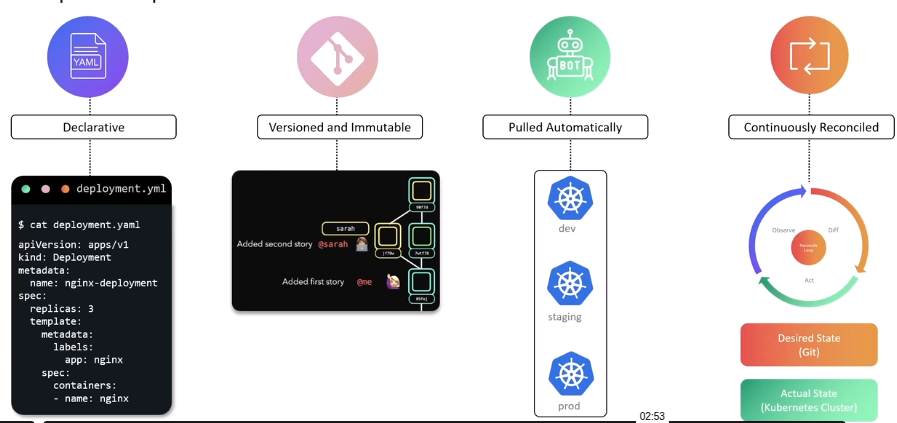
GITOPS PRINCIPLES
GitOps can be considered an extension of IaC that uses Gitas the version control system
- Declarative
- Versioned and Immutable
- Pulled automatically: Continuously pulls
- Continuously reconciled: Always matches the desired state
ArgoCD Basics
It is a declarative, GitOpscontinuous delivery tool for Kubernetes resources defined in a Git repository.
It uses Git repositories as the source of truth for the desired state of app and the target deployment environments
ArgoCD Concepts and Terminology:
- Application
- Application source type
- Project
- Target state
- Live state
- Sync status
- Sync
- Sync operation status
- Refresh
- Health
ARGOCD APP
Create an App
argocd app create color-app \
--repo https://github.com/sid/app-1.git \
--path team-a/color-app \
--dest-namespace color \
--dest-server https://kubernetes.default.svc
Automatically deploys de manifest
apiVersion: argoproj.io/v1alpha1
kind: Application
metadata:
  name: color-app
  namespace: argocd
spec:
  project: default
  source:
    repoURL: 'https://github.com/sid/app-1.git'
    targetRevision: HEAD
    path: team-a/color
  destination:
    server: 'https://kubernetes.default.svc'
    namespace: color
  syncPolicy:
    automated:
      selfHeal: true
    syncOptions:
      - CreateNamespace=true
- Source: Desired state
- Destination: Place where it needs to be deployed
ArgoCD Demo
Official Getting Starteddocumentation.
And the git repository if you want an older version: HERE
ArgoCD CLI installation HERE
kubectl create namespace argocd
kubectl apply -n argocd -f https://raw.githubusercontent.com/argoproj/argo-cd/v3.0.5/manifests/install.yaml
To see the ArgoCD resources
kubectl -n argocd get all
The UI is on service/argocd-server
kubectl -n argocd edit srv argocd-server
And change type: ClusterIP to type: NodePort
So we are able to access the UI.
The initial password is on secrets
kubectl -n argocd get secrets
kubectl -n argocd get secrets argocd-initial-admin-secret -o json
# To filter
kubectl -n argocd get secrets argocd-initial-admin-secret -o json | jq .data.password -r | base64 -d
#Output: xxxxxxxxxxx
IMPLEMENTING APPLICATION
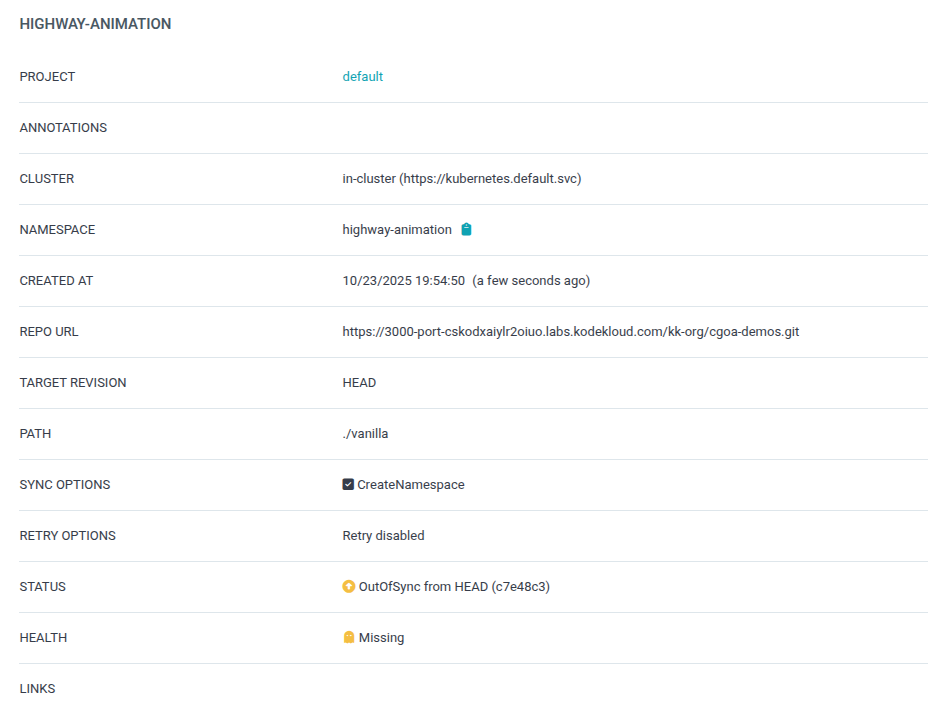
Create New Application in ArgoCD
- Sync: When
syncwe need to make sure theAuto-Create Namespaceis enabled - When we
syncthe code on therepowill be deployed intoKubernetes
kubectl get namespaces
NAME                STATUS   AGE
argocd              Active   15m
default             Active   10h
highway-animation   Active   104s # <--- Created
kube-flannel        Active   10h
kube-node-lease     Active   10h
kube-public         Active   10h
kube-system         Active   10h
If we manual change something with
kubectlcommands, the status onargoCDwill beOutOfSyncIf we
syncagain. We will go back to what the repository saysWe also can have
auto-sync(automatically reconcile whenever there is drift)
If we change the
repoand since we’ve appliedauto-syncwe will see the changes on thekubernetes
GITOPS PATTERNS
GitOps Reconciler Types: In-Cluster Vs External
Ib-Cluster: Enhanced security and simplicity. Do not expose secrets. External: Outside the cluster
Push Vs Pull Based Deployment
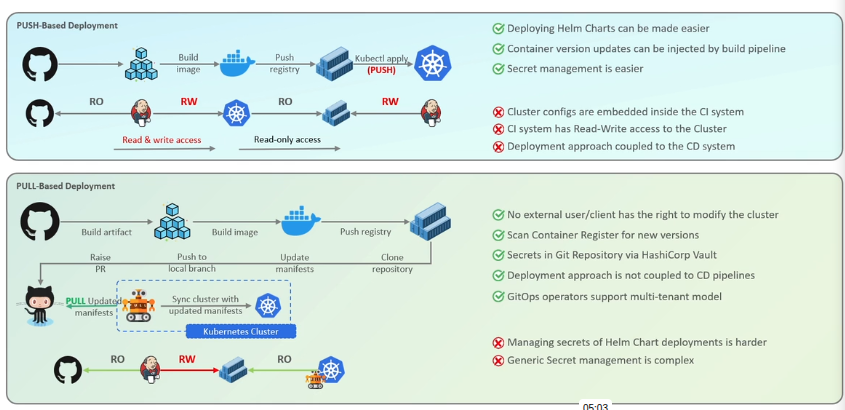
ConfigMap: ArgoCD Pull Based Reconciler
We can edit the configmap of ArgoCD with the command:
kubectl -n argocd edit configmap argocd-cm and add:
apiVersion: v1
data:
  timeout.reconciliation: 10s # <-------- This line
  [...]
But also a restart is needed:
kubectl rollout restart sts argocd-application-controller -n argocd
ArgoCD Event Driven Reconciler (Webhook)
Base on this Documentation
For the purpose of this lecture, we will use insecure mode:
kubectl edit configmap argocd-cmd-params-cm -n argocd
And add a line
[...]
data:
  server.insecure: "true"
and restart kubectl -n argocd rollout restart deployment argocd-server
After that the webhook needs to be configured on the UI of the Github. With that we can have automatic sync with any push.